SHOUTcast Widgets V10 Now with a live DJ Studio

Professional widgets, station websites and a live DJ booth for AzuraCast - 100% browser-based, nothing to download or install. Mix two decks, talk over the music, fire sound effects and go live from any computer.

No software to install 100% browser-based No extra hardware
or explore all features
v10.shoutcastwidgets.com/panel/azuracast-control
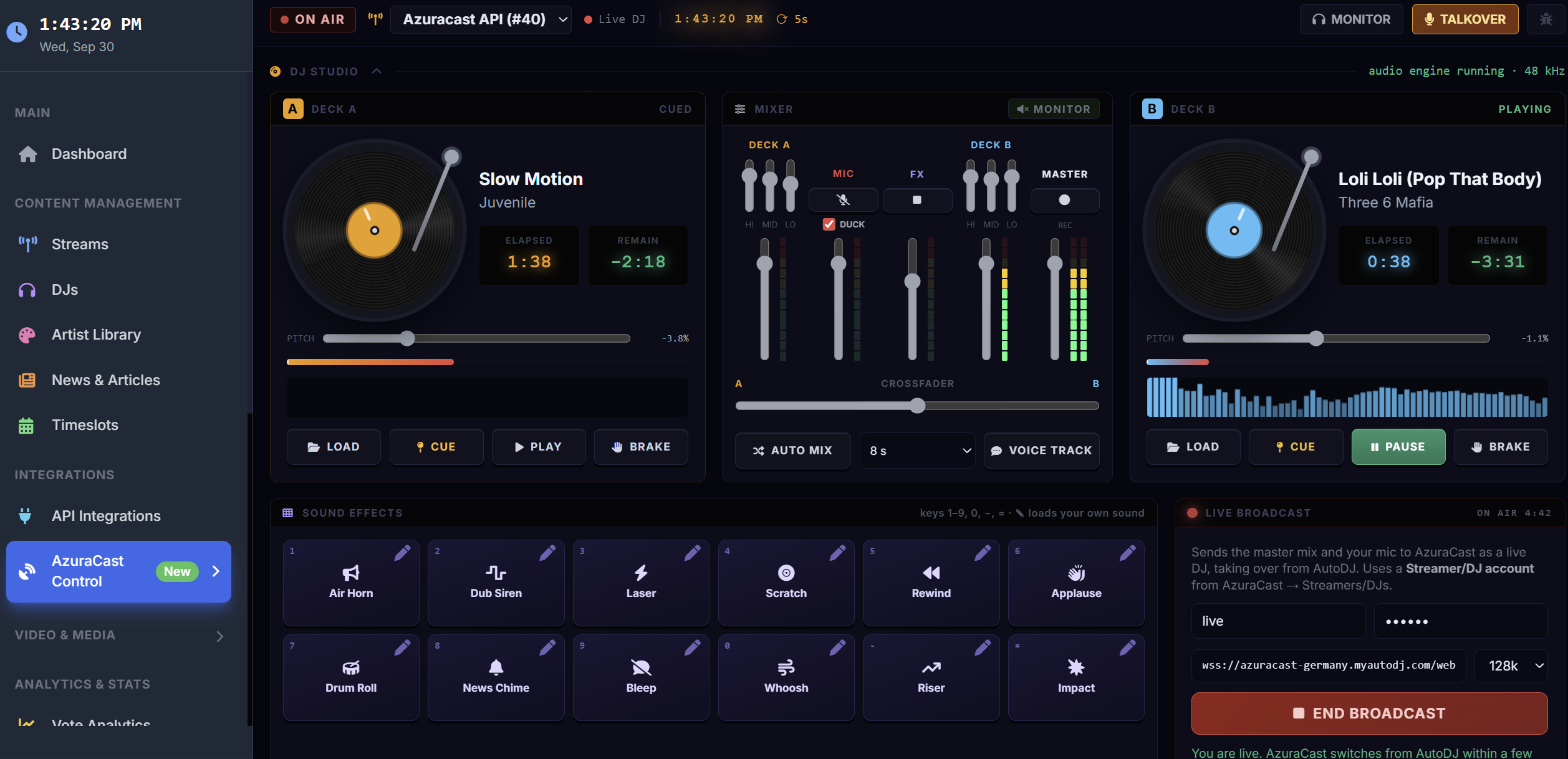
AzuraCast DJ Studio: two turntables, a mixer with crossfader, 12 sound-effect pads and the live broadcast panel, on air

Works with

SHOUTcast v1 & v2 Icecast AzuraCast CentovaCast MediaCP
NEW · AzuraCast DJ Studio

A full DJ booth, right in your browser

Mix two decks, talk over the music, fire sound effects and broadcast live to your AzuraCast station - no DJ software to install and no extra hardware. It's built into your SHOUTcast Widgets control panel.

2
turntable decks
12
sound-effect pads
1-click
Go Live to AzuraCast
100%
browser-based

No software required

The DJ Studio runs entirely in your web browser. Log in from any computer - at the studio, at home or on the road - and you're on air.

The usual way

  • Install broadcast software
  • Configure encoders
  • Route audio & plugins

DJ Studio

  • Open your browser
  • Log in
  • Press Go Live

Twin Turntables

Spinning platters with the album art on the label. Cue points, ±8% pitch, drag-the-platter tempo nudge and a vinyl-style brake. Load tracks from your station library or drop in files from your computer.

Pro Mixer

3-band EQ on each deck, channel faders, a smooth equal-power crossfader and real stereo level meters. Auto Mix starts the other deck and fades across for you.

Go Live From Your Browser

Send the whole mix and your mic straight to AzuraCast with your DJ login. AutoDJ steps aside while you are live and picks up again when you finish.

Talk Over the Music

Open the mic or hold Space to talk. The music dips automatically while you speak, and the mic never feeds back through your speakers.

12 Studio Sound Effects

Air horn, dub siren, scratch, rewind, applause, drum roll, news chime, whoosh, riser, impact and more - loudness-matched and polished with reverb. Keys 1 to = fire them, and any pad can hold your own sound.

Voice Tracks

Not going live? Record a quick link, preview it, and AzuraCast plays it now or right after the current song - then AutoDJ carries on.

Station Control

Now playing with an accurate countdown, skip, restart, stop and start, the upcoming queue, recently played, and an instant-play request line for your whole library.

Record Your Mix

One click records the master output and saves it to your computer - ready for a podcast, a replay or a demo.

Smart Playlists

Build playlists scored by listener votes, play history and freshness, with station IDs and adverts slotted in. A public URL keeps AzuraCast up to date.

On air in three steps

1

Connect AzuraCast

Add your AzuraCast station and API key under API Integrations. Your library, queue and now playing appear instantly.

2

Load & mix

Open the DJ Studio, load tracks onto the decks, set your levels and line up your sound effects.

3

Go live

Enter your AzuraCast DJ login and press Go Live. Your listeners hear you within seconds.

Requires an AzuraCast station. Going live needs Streamers/DJs enabled on the station and a DJ account. Works in Chrome, Edge and Firefox on desktop.

Complete Widget Suite

Everything you need to create an engaging web experience for your listeners

Real-Time Updates

Live updates every 10-30 seconds showing current track, listener count, artist info, and DJ information.

Fully Customizable

Match your station's branding with custom colors, themes, fonts, and layout options. Choose from modern, classic, or custom designs.

Responsive Design

Perfect display on all devices - desktop, tablet, and mobile. Automatically adapts to any screen size.

Multi-Platform Support

Works with SHOUTcast v1/v2, Icecast, AzuraCast, CentovaCast, MediaCP, and custom streaming servers.

Artist Information

Automatic artist bios, images, and album artwork from Last.fm and Spotify APIs. No manual updates needed.

Easy Integration

Simple copy/paste embed codes. Works with WordPress, Wix, Squarespace, and any website builder.

Event Management

Create and manage recurring shows, special events, and broadcast schedules with automatic timezone conversion.

DJ Profiles

Showcase your DJs with custom profiles, photos, bios, and social media links. Display who's live automatically.

Analytics & Insights

Track listener statistics, peak times, popular tracks, and geographic distribution of your audience.

20+ Professional Widgets

Choose from our complete library of widgets to showcase every aspect of your station

Now Playing

Current track with artist info and album art

HTML5 Player

Beautiful audio player with visualizer

Advanced Player

Full-featured player with queue & history

Recently Played

Track history with timestamps

DJ Profile

Current and upcoming DJ information

Weekly Schedule

Full weekly show timetable

Classic Timetable

Horizontal scrolling schedule

Events Calendar

Upcoming shows and special events

Time Wheel

24-hour circular schedule display

Listener Map

Geographic listener visualization

Weather Widget

Local weather display

Statistics

Listener counts and trends

Listener Count

Real-time listener statistics

Stream Status

Online/offline indicator badge

Text Only

Minimal text-based now playing

Artwork Only

Album art display widget

Mini Player

Compact floating player

News Feed

Station news and announcements

RSS Integration

Import news from RSS feeds

Song Voting

Let listeners vote on tracks

Version 10 Updates

Track our continuous improvements and upcoming features

NEW September 2026

AzuraCast DJ Studio

  • Two turntable decks with pitch, cue and brake, plus a full mixer with EQ and crossfader
  • Go live to AzuraCast straight from the browser, with mic ducking
  • 12 polished sound-effect pads, and custom sounds of your own
  • Voice tracks that play now or next, and one-click mix recording
  • Accurate now-playing countdown and instant-play requests
See the DJ Studio →
FINAL RELEASE Now available

Version 10 - Final Release

The completely rebuilt platform is out of beta and available to every station.

  • Complete platform rebuild with modern PHP 8
  • 20+ professional widgets with real-time updates
  • Event management with recurring shows
  • DJ profiles and schedule management
  • AzuraCast integration with a full control panel
  • Website builder with multiple themes
  • Listener maps, track analytics and song voting
  • WHMCS integration for automated provisioning
COMPLETED February 2026

Public Beta

  • Early access for the first radio stations
  • Beta testers' feedback shaped the final release
COMPLETED December 2025

Internal Testing Phase

  • Core platform architecture completed
  • All major widgets developed and tested
  • Security and performance optimization
WHAT'S NEXT On the roadmap

Coming to Version 10

  • Mobile app for DJ management
  • Social media auto-posting
  • Listener accounts
  • Live chat widget
  • Multi-language support

Simple, Transparent Pricing

Choose the plan that fits your station's needs

Basic

$4.95 /month
  • Up to 3 streams
  • All widget types
  • Basic customization
  • Email support
Order Basic Plan
POPULAR

Pro

$7.95 /month
  • Up to 10 streams
  • All widget types
  • Advanced customization
  • Premium themes
  • Priority support
Order Pro Plan

Business

$12.95 /month
  • Unlimited streams
  • All widget types
  • Full customization
  • White label option
  • 24/7 priority support
Order Business Plan

Ready to Upgrade Your Station?

Join hundreds of radio stations using SHOUTcast Widgets V10 to engage their listeners.

Order Now - Starting at $4.95/mo

Already have an account? Login here